
Wednesday, October 19, 2016


Saturday, April 2, 2016
Last lesson of MSE 850
This is the presentation slides that I will use on 7 April to conclude my learning for MSE 850.
Wednesday, March 30, 2016
Apps to help students with autism
Today, I scooped an article on apps to support autistic pupils learning @ http://www.learninginspired.com/8-apps-to-support-autistic-pupils-learning
I will try out these apps today before lesson today:
1) To provide Structure for student learning
Tool 1: Wunderlist
Tools 2: Showbie.
2) Positive reinforcement
Tool 1: Behavior World Reward Chart System
3) Empathy: understanding the triggers to negative behaviors
Tool : Foldr .
4) Low Arousal: managing students' attention
Tool:FindMe
5) Links : Providing platform
1) Evernot e
2) Google Doc
I am using Evernote and Google Doc, so I will not test them again.
I will try out these apps today before lesson today:
1) To provide Structure for student learning
Tool 1: Wunderlist
Tools 2: Showbie.
2) Positive reinforcement
Tool 1: Behavior World Reward Chart System
3) Empathy: understanding the triggers to negative behaviors
Tool
4) Low Arousal: managing students' attention
Tool:
5) Links
1) Evern
2) Google Doc
I am using Evernote and Google Doc, so I will not test them again.
Monday, March 28, 2016
Tool this week: RECAP
I have tried a new apps today. It is RECAP :
It allows teachers to post a video and the students canresponse ; and oral
skill

It allows teachers to post a video and the students can

The creation of account is very version though
Saturday, March 19, 2016
My life as an educator from ICT mp1 to ICT mp4
I will like to share my journey in using technologies as an educator. I joined teaching in 2001 after I graduated from NUS. The technologies that I was introduced then was the whiteboard with 2 markers, transparencies and overhead projectors. Data loggers were locked in the cupboard and teachers hardly used it.
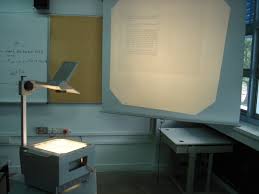
At that time, Singapore schools were reaching the end of ICT Master Plan 1 (1997 - 2002). The laptop provided to us were used for checking email and uploading result. 2 teachers were to share 1 computers and schools are also equipped with LCD projectors to connect. Believe it or not, I am the first teachers who turn on the LCD projectors and actually used them in my college. My HOD ICT tried his best to encourage the teachers to use their laptops, but the OHPs were still used by teachers until late 2006.
In 2006, I was asked to take over the Head of ICT department. The first thing I do was to phase out all the OHP and encourage teachers to use the computer. To encourage teachers to use the computer, I had procured tablet PCs for all my teachers. I also removed the desktop computer in all classrooms. I was faced with many resistances and complaints. To help my teachers, I conducted many sharing and training sessions to enthuse and help my teachers to use the technologies. At about the same time, there were many web 2.0 tools being developed to support teaching. In order to be a credible HOD, I studied on my own about these tools and experimented thousands of these tools. I also started to make teaching videos with my teacher and we were the first group of educators in Singapore that used Camatasia to make a teaching video (at that time it is version 2 or 3, I can't remember clearly).
It was a good three years from 2006 that my knowledge in using ICT had improved quite tremendously, I even had developed a school information portals with my TAs. I also startedHome
In 2009 (the start of ICT mp3), I realized that the teachers
need
These two models had served me very well for the next 6 years until I left my college to serve as a school leader. By the time when I left college, most of my teachers are already confident users of ICT in the classroom. If you asked me for the critical success factors of my 9-year efforts, I will tell you that they are 1) Excellent ICT Support, 2) Continuous Professional Training and 3) Effective Collaborative learning of the teachers.


If you asked me to give a deeper analysis of the critical success factors, I will like to summarize my efforts using my philosophy as an educator, my ICT effort always strives at
1) Providing Hope (teacher should not be discouraged in using ICT)
2) Providing Joy (Teachers must enjoy the learning of ICT)
3) Providing Convenience (Set up and maintain excellent ICT support and infrastructure)
4) Finally, provide Confidence (the teacher must experience success in using ICT and the best way to do so is through collaborative efforts like PLCs)
I am now guiding my teachers in the next journey of our ICTmasterplan
At that time, Singapore schools were reaching the end of ICT Master Plan 1 (1997 - 2002). The laptop provided to us were used for checking email and uploading result. 2 teachers were to share 1 computers and schools are also equipped with LCD projectors to connect. Believe it or not, I am the first teachers who turn on the LCD projectors and actually used them in my college. My HOD ICT tried his best to encourage the teachers to use their laptops, but the OHPs were still used by teachers until late 2006.
In 2006, I was asked to take over the Head of ICT department. The first thing I do was to phase out all the OHP and encourage teachers to use the computer. To encourage teachers to use the computer, I had procured tablet PCs for all my teachers. I also removed the desktop computer in all classrooms. I was faced with many resistances and complaints. To help my teachers, I conducted many sharing and training sessions to enthuse and help my teachers to use the technologies. At about the same time, there were many web 2.0 tools being developed to support teaching. In order to be a credible HOD, I studied on my own about these tools and experimented thousands of these tools. I also started to make teaching videos with my teacher and we were the first group of educators in Singapore that used Camatasia to make a teaching video (at that time it is version 2 or 3, I can't remember clearly).
It was a good three years from 2006 that my knowledge in using ICT had improved quite tremendously, I even had developed a school information portals with my TAs. I also started
In 2009 (the start of ICT mp3), I realized that the teachers
These two models had served me very well for the next 6 years until I left my college to serve as a school leader. By the time when I left college, most of my teachers are already confident users of ICT in the classroom. If you asked me for the critical success factors of my 9-year efforts, I will tell you that they are 1) Excellent ICT Support, 2) Continuous Professional Training and 3) Effective Collaborative learning of the teachers.
If you asked me to give a deeper analysis of the critical success factors, I will like to summarize my efforts using my philosophy as an educator, my ICT effort always strives at
1) Providing Hope (teacher should not be discouraged in using ICT)
2) Providing Joy (Teachers must enjoy the learning of ICT)
3) Providing Convenience (Set up and maintain excellent ICT support and infrastructure)
4) Finally, provide Confidence (the teacher must experience success in using ICT and the best way to do so is through collaborative efforts like PLCs)
I am now guiding my teachers in the next journey of our ICT
Thursday, March 17, 2016
Ten Tools to Know
Ten Tools to know
I will like to share how I use the 10 tools here:1) Using a Photos -take, edit, and upload
There are two apps (
Learning and Teaching Ideas

2) Using Video-take, edit, send and upload
I use iMovies icloud drive
Learning and Teaching Ideas
There are many ways to use
3) Screencasting
I have used many screencast tools before.
Screencast-O-matics
If you want to have a simple version. You can try installing camstudio work
Below is an example of screencast I created using webcam deskstop
4) Whiteboarding
I seldom used whiteboarding Educreation ipad
Read :http://kimthyelearning.blogspot.co.id/2016/03/my-whiteboarding-experience-using.html
5) Back Channel Discussion
I used todaysmeet padlet further more also support

6) Blogging/LMS/Webpage
I seldom do blogging but may consider it for professional development of my teachers but
Try creating webquest
7 & 10) Polling: use a


8) Twitter: Ways to
9) Google Drive:
Google Drive has been used by Singapore educator for collaboration for quite some time. Below is an example of forms that I have created and shared with my staff on book order:

Thursday, March 10, 2016
Thursday, February 4, 2016
My experience of using Screencast
My Experience of using Screencasting
Tools/Apps that I have used before:
1) MS PowerPoint: Using Narration Function and save the file as video format. The online tutorial can be found here :
2) MS Media Encoder: Online Tutorial: https://www.youtube.com/watch?v=Rsj8oz0_JJI
3) Screen-o-Matic: easy to use but restricted by 15 minute recording
4) Cam Studio (http://camstudio.org/): Open Source Software thatare
5) Camtasia (http://discover.techsmith.com/): Inexpensive software that can create teaching packageswith
6) Beside YouTube, screencast.com(http://www.screencast.com/) is also a good site for streaming and distributing your screencast . ve a 2 G B of space free to use.
Below is how you cancreat

Here is an example of screencast that I have created using Camtasia and the uploaded to Screencast.
http://www.screencast.com/t/i2JrEJZVKYa
Tools/Apps that I have used before:
1) MS PowerPoint: Using Narration Function and save the file as video format. The online tutorial can be found here
2) MS Media Encoder: Online Tutorial: https://www.youtube.com/watch?v=Rsj8oz0_JJI
3) Screen-o-Matic: easy to use but restricted by 15 minute recording
4) Cam Studio (http://camstudio.org/): Open Source Software that
5) Camtasia (http://discover.techsmith.com/): Inexpensive software that can create teaching package
6) Beside YouTube, screencast.com(http://www.screencast.com/) is also a good site for streaming and distributing your screencast
Below is how you can

http://www.screencast.com/t/i2JrEJZVKYa
Thursday, January 28, 2016
My experience of making a video with caption
This is a video that I made using iMovie Apps in my iPad. Then I uploaded to my YouTube to share with my students.
Wednesday, January 27, 2016
Sharing: ICT TOOLS that I have used in my teaching (Polling)
There are two tools that I have used in my teaching that I will like to share:
1) Socrative.com: A very easy-to-use mobile learning that support formative assessment in the classroom. Students can share mobile devices to complete the quiz set by the teachers. Display of the quiz questions on the mobile devices is excellent and supported uploading of pictures.
2) Plickers.com: A wonderful polling solution that only requires the teacher's mobile phone for the lesson. Ideal in classrooms with poor connectivity or the school does not allow the use of mobile devices.
1) Socrative.com: A very easy-to-use mobile learning that support formative assessment in the classroom. Students can share mobile devices to complete the quiz set by the teachers. Display of the quiz questions on the mobile devices is excellent and supported uploading of pictures.
2) Plickers.com: A wonderful polling solution that only requires the teacher's mobile phone for the lesson. Ideal in classrooms with poor connectivity or the school does not allow the use of mobile devices.
Saturday, January 23, 2016
Classroom Playlist 2015
This is my first blog and it was set up for the my eighth module of my master course: MSE850.
I have taken up this course because there is no module for us to take for my core module in Learning Science and Technologies. I also hope to meet up with special needs educators and learn with them on how technologies can support learning, especially for students with behavioral or learning difficulties.
Dr Zachary asked the class to put up a playlist of songs forclassroo m (
Myfavourite songlist is:
Dr Zachary asked the class to put up a playlist of songs for
My
- 張學友 - 我等到花兒也謝了 (國) (1995)
- 张学友 李香兰
- 林憶蓮 Sandy Lam&李宗盛 Jonathan Lee
【 】 - Jonathan Lee李宗盛 [ 山丘 ]
- 陳奕迅 + 王菲 【因為愛情】
- 陳奕迅 - 十年
- 陳奕迅 - 富士山下
- 梁文福 - 太多太多
- 林俊杰 + 陈洁仪+梁文福 - 细水长流
- JJ Lin- Jiang Nan
Not sure what to do next for this blog. Will think about this next week.
Subscribe to:
Comments (Atom)